AI Lawyer Headshots for Attorneys and Law Firms
A practical 2026 guide to AI lawyer headshots: where to use them, what makes them credible, source-photo tips, firm consistency, pricing checks, and rights.


4.8+/5 by 85,548 happy customers
By | Founder ExecHeadshots·
AI lawyer headshots are useful when they make a lawyer look credible, current, and recognizable across the places a prospective client checks before making contact: the firm website, LinkedIn, legal directories, conference bios, email signatures, and proposal decks. The goal is not to look glamorous. The goal is to look like the attorney a client expects to meet on the first consultation call.
This guide explains when AI lawyer headshots make sense, what a credible attorney portrait should look like, how to prepare source photos, and how to use ExecHeadshots for individual attorneys or a full firm refresh. It also removes the usual marketing exaggeration: no headshot can guarantee more inquiries, but a dated, inconsistent, or low-quality photo can weaken trust before a client reads your credentials.
Search intent: what people want from AI lawyer headshots
The top-ranking pages for “AI lawyer headshots” are commercial landing pages. They do not spend much time on photography theory; they answer practical buying questions: how fast it works, where the photos can be used, whether the result looks trustworthy, what attire and background options exist, whether teams can stay consistent, and what rights the buyer gets.
That means this article should help a lawyer decide whether AI is appropriate, then give them a clear path to create a conservative, client-ready image. For broader legal marketing context, Clio’s 2025 Legal Trends Report notes that more consumers expect to look for legal support online, with firm websites and online reviews playing a role in how they choose counsel.
Where attorneys can use AI lawyer headshots
AI lawyer headshots work best on professional surfaces where recognition, consistency, and polish matter more than documentary photography.
- Law firm bio pages and partner pages, where the photo sits next to practice areas, bar admissions, and contact details.
- LinkedIn profiles, especially for attorneys who publish, recruit, network, or receive inbound referrals through LinkedIn.
- Legal directories, award submissions, speaking bios, podcast pages, and press quotes.
- Email signatures, proposal decks, pitch materials, and internal people directories.
- Firm-wide website refreshes where partners, associates, and remote offices need a consistent visual standard.
What makes a lawyer headshot credible?
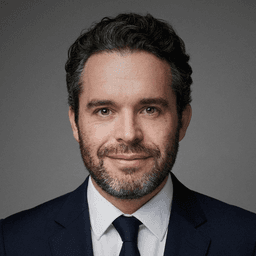
A strong lawyer headshot should communicate competence without looking stiff or artificial. In practice, that means a clean head-and-shoulders crop, even lighting, a neutral or office-appropriate background, conservative attire, and an expression that feels calm and approachable.
For most attorneys, avoid overly dramatic lighting, glossy fashion retouching, courtroom cosplay, aggressive crossed-arm poses, and backgrounds that look generated for a movie poster. Legal clients are usually trying to decide whether you seem steady, serious, and easy to speak with.
AI vs a traditional lawyer photoshoot
A photographer is still the right choice when your firm needs a custom brand campaign, environmental portraits in the office, group shots, or live direction for a senior leadership shoot. AI is a better fit when you need fast, consistent individual portraits without coordinating calendars, travel, hair, makeup, studio time, and retouching rounds.
Cost is also different. AI headshot tools usually charge a one-time package price, while traditional headshots include session time and edited-image delivery. Use our professional headshot cost guide to compare current ranges before deciding which route fits the firm.
How to create AI lawyer headshots with ExecHeadshots
1. Choose source photos that show your current face
Upload clear, recent photos where your face is visible from more than one angle. Use simple selfies or casual photos with normal expressions. Avoid sunglasses, hats, heavy filters, extreme shadows, face-obscuring hair, and old photos that no longer match how you look.
2. Pick conservative attire and backgrounds
For attorneys, simple usually wins: navy, charcoal, black, or deep neutral jackets; light shirts; restrained ties if that fits your practice; and clean backgrounds such as a plain studio backdrop, office, boardroom, or muted bookshelf. For more detail, use our guide to what to wear for professional headshots.
3. Review for likeness before polish
The best-looking image is not always the best professional image. First ask whether the face, hairline, jaw, eyes, and expression still look like you. Then check the details: collar shape, tie knot, glasses, hands, earrings, teeth, background edges, and whether the crop will still read well as a small LinkedIn avatar.
4. Download a small working set
Choose one primary image for LinkedIn and the firm bio, then keep a few alternates for speaking pages, proposals, and internal profiles. A firm should document the preferred crop, background, and attire standard so future attorney headshots stay consistent.
Firm-wide AI lawyer headshots
AI is especially useful for firms with attorneys in several cities or remote offices. Instead of booking separate photographers, the firm can ask everyone to upload photos, choose a shared visual direction, review outputs centrally, and publish a consistent set across the website and directories.
For firms, the operational checklist matters as much as image quality: confirm commercial usage rights, privacy and deletion terms, review workflow, support or re-run policy, download resolution, and whether new hires can match the same look later.
What to check before choosing a provider
- Likeness: examples should look like real attorneys, not generic business avatars.
- Rights: confirm that paid outputs can be used commercially on firm websites, directories, ads, and printed materials.
- Privacy: look for clear language about uploaded photos, retention, deletion, and whether images train shared models.
- Resolution: make sure downloads are high enough for the firm website, profile crops, and light print use.
- Support: check whether the provider offers re-runs or review help when the first set misses likeness.
Frequently asked questions
Can I use AI lawyer headshots on my law firm website?
Yes, if the image is your likeness and the provider gives commercial usage rights. A firm website is one of the best uses for AI lawyer headshots because consistency across attorney bios often matters more than the story of how each image was created.
Can I use an AI lawyer headshot on LinkedIn?
Yes, if it looks like you and does not misrepresent your identity. LinkedIn’s Professional Community Policies tell members not to use someone else’s image or an image that is not their likeness for a profile photo.
Are AI lawyer headshots realistic enough for legal profiles?
They can be, but the provider and the source photos matter. Reject any image that changes your face, over-smooths skin, creates strange eyes or teeth, or makes your attire look physically impossible. In law, a slightly understated image is usually better than an obviously synthetic one.
Who owns the final professional headshots?
Ownership and usage rights depend on the provider’s terms. Before uploading, confirm whether you can use the outputs commercially, whether the provider keeps rights to show examples, and how to delete source photos if needed.
Should law students use AI lawyer headshots?
Law students can use AI headshots for LinkedIn, internship profiles, clerkship networking, and student organization pages if the photo stays realistic and professional. For formal bar, court, visa, passport, or government ID requirements, use the official photo process instead of an AI-generated image.
Bottom line
AI lawyer headshots are a practical option for attorneys and firms that need credible, consistent portraits quickly. Use them where a professional photo helps clients recognize and trust you, keep the style conservative, verify likeness at full size, and confirm privacy and usage rights before publishing.
Article by
Ben is a pioneering AI engineer and the founder of ExecHeadshots, Europe’s premier AI-powered professional portrait platform. With a deep technical pedigree - having served as a lead AI engineer at Snapchat and Zenly - Ben launched ExecHeadshots in Paris in 2022 to bridge the gap between high-end studio photography and generative technology. Under his leadership, ExecHeadshots has helped over 80,000 professionals and executives globally redefine their digital identity. By leveraging cutting-edge machine learning and rigorous European privacy standards, Ben has engineered a platform that delivers ultra-realistic, studio-quality headshots in under 30 minutes. His mission is to provide every leader with an authoritative executive presence, combining his expertise in computer vision with a commitment to professional-grade aesthetics.